
An email address lookup can help you decide if you should trust a message before you click, reply, or send anything important. It is a way to search public records and online profiles that may be connected to an email address so you can spot red flags and protect yourself.
In this guide, you will learn what an email address lookup can reveal, what it cannot legally or safely show, and how to use these tools in a smart, respectful way. We focus on personal safety, scams, and basic identity checks, so you can feel more confident the next time a strange email shows up.
ReverseThatLookup is for personal safety, identity verification, and general informational purposes only. It should never be used for employment screening, tenant screening, credit decisions, insurance decisions, or any other use governed by the Fair Credit Reporting Act (FCRA).
What You Can Safely Learn From an Email Address Lookup
An email address lookup searches public and semi-public data that might be tied to that address. That might include a possible name the owner uses, usernames and handles on different sites, social media profiles that list that email, mentions in public posts or forums, and signs the email has appeared in past data breaches via publicly available breach-notice tools. Sometimes you might also see a rough location from a public profile, such as a city or state, a phone number if the person chose to post it with that email, and other emails or usernames that show up with the same person.
All of this is based on public clues, not private inboxes. The results are not perfect or guaranteed. Information can be outdated, incomplete, or inaccurate; linked to more than one person over time; or tied to fake names, nicknames, or throwaway accounts.
Still, these clues can be very helpful. For example, you can safely use an email lookup to check if a marketplace seller looks consistent across sites, see if a “job recruiter” email matches the company they claim, or get a bit more context about a dating profile before you meet in person.
Always treat lookup results as one piece of information, not final proof of who someone is.
What Stays Private and Out of Reach
A lawful email address lookup cannot, and should not, show private data. It does not open someone’s inbox. It does not pull secrets from inside accounts. That means no email contents or attachments, passwords or security answers, banking or credit card details, Social Security numbers or tax records, exact real-time location, or private messages on any platform.
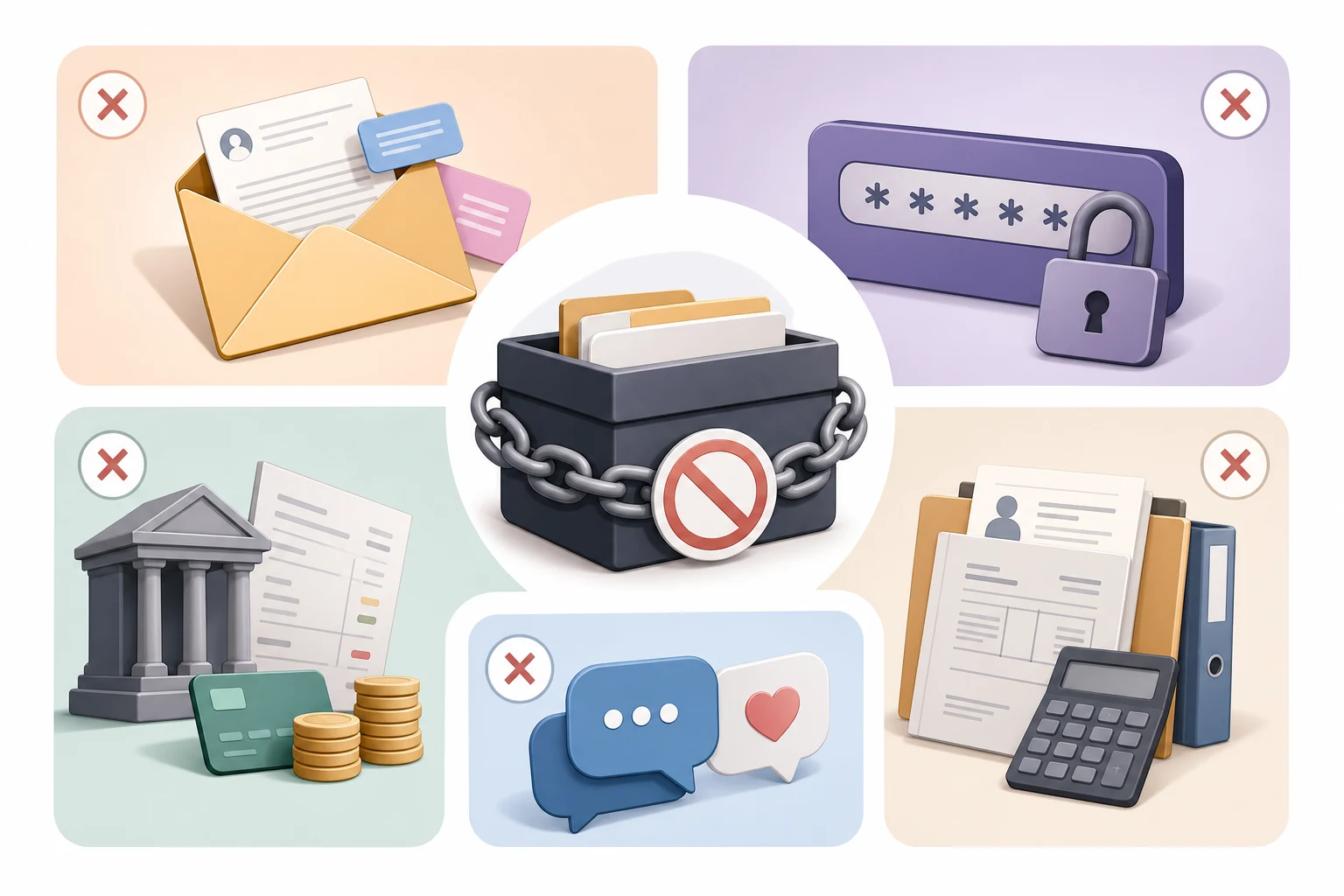
There are some common myths to clear up. There is no “secret spying” into accounts, and you will not get a full, definitive background report from a single email. You cannot see paid subscription content or locked-down social profiles, and you cannot log in to someone’s account just by looking up their email.
Privacy laws, computer crime laws, and site rules are very strict about this. Reputable services stay on the legal side and only use sources that are allowed, such as public records, open profiles, and other lawful data.
Free Ways to Check an Email Address Safely
Before you use any dedicated tool, you can do several free checks on your own. Here is a simple step-by-step list:
- Type the email into a major search engine in quotes. See if it shows on public pages, forums, or spam reports.
- Search the email inside social media platforms. Some sites let you search by email in their own search bar.
- Look at the domain. For business emails, see if the domain matches the real company name and website.
- Check the sender details inside the email header. Look for obvious fakes, spelling mistakes, or strange domains.
- Use official breach-notice tools (such as major password-check or breach-notification sites) to see if the email has been in a known data leak.
As you review what you find, ask yourself:
- Does the same name and photo show up across profiles?
- Is the email tied to a real-looking domain or a random throwaway address?
- Does it look like it has been used for a long time, not just a few days?
- Does it show up in scam or spam complaint forums?
Keep strong safety habits while you do this:
- Do not reply with personal or financial information.
- Do not click links or open attachments from senders you do not trust.
- Never log in to anything through a link in a suspicious email.
- If someone asks for urgent money, confirm through a trusted phone number or channel first.
Those habits matter most when a message is pushing you to act fast, and learning to spot phishing emails covers the sender, link, tone, and attachment checks to run first.
Compare Email Clues With Other Signals
An email address should fit the rest of the person’s identity. A name in the address, a matching public profile, and a consistent city make a result more plausible. A mismatch between the email, dating profile, photos, and payment request should slow everything down.
Search the exact email in quotes. Then search the username part before the @ symbol. Some people reuse that handle on social platforms, forums, photo sites, or business pages. Do not assume a match is current unless the page has recent activity.
Use image search when photos are part of the concern. Google Images at images.google.com can help check whether a profile photo appears elsewhere, though a match may point to a stolen image rather than the person messaging you.
How To Read What the Results Might Mean
| Result | Possible Meaning | What To Check Next |
|---|---|---|
| Name match | The email may connect to the claimed identity. | Compare city, profile photo, and other details. |
| No results | The address may be new, private, or unused publicly. | Ask for another verification method. |
| Different name | The email may belong to someone else or an old account. | Pause before sharing information. |
| Business domain | The sender may claim professional identity. | Verify through the company’s official website. |
No result is not proof of fraud. A strange result is not proof either. The useful question is whether the email evidence fits everything else you know.
When a Dedicated Email Lookup Tool Makes Sense
Sometimes free checks are not enough. That can happen when you keep getting harassing messages from a burner email, when you are about to make a high-value online purchase or payment, or when a stranger keeps contacting you and claims to be a company or group, but something feels off.
In these cases, an email address lookup tool can save time by pulling many public clues into one place.
At ReverseThatLookup, we search public records, open profiles, and other legally allowed sources to see what might be linked to that email. The goal is to give you more context, such as possible names and usernames, public social accounts, and other contact details that the person has chosen to post publicly.
We set honest expectations. Results vary a lot from one email to another: some emails are brand new or used only for private logins, so you might see very little, while others may have a long history of public use.
The value is in gathering small pieces of information into a single report, not in promising complete, private, or guaranteed-accurate data.
ReverseThatLookup reports are for informational purposes and personal safety checks only. They are not consumer reports and must not be used for employment, tenant, credit, insurance, or other FCRA-regulated decisions.
Dedicated tools also disagree with each other, and the approach to comparing results from different phone lookups shows how to decide which name, city, or carrier to trust.
Checking a Dating Contact by Email
A reverse email lookup is useful when a dating profile moves to email quickly, a person avoids video or phone verification, or the story changes between platforms. It can also help when an email claims to be from a real person but feels scripted.
Use email lookup when the address is your main clue. Use a people search when you have a name, city, or phone number and want to compare identity details across several sources.
For the dating-specific email workflow, see dating site email lookup.
A different worry is a current partner’s hidden account, and the signs covered in how to catch a cheater show which patterns matter and why no single sign proves anything.
Watch for Dating Scam Warning Signs
Be careful when a match uses email to move away from app moderation, then asks for money, private photos, crypto, travel help, or secrecy. The FTC’s romance-scam guidance at consumer.ftc.gov explains why early trust-building and financial requests are common in romance fraud.
Search the email address, but also search phrases from the message. Scam scripts are often reused. If the email appears in unrelated names, copied bios, or warning posts, stop engaging.
If money was sent or threats appear, preserve evidence. The FBI’s Internet Crime Complaint Center at IC3.gov accepts internet crime reports, and AARP’s scam resources at aarp.org can help families discuss the situation.
Verify Without Overreaching
Ask for a live video call, a public professional profile, or a normal conversation through the dating app before you share more. A real person should be able to verify identity without demanding passwords, codes, banking details, or private images.
Do not use a reverse email search identity result to contact relatives, employers, or unrelated accounts unless there is a serious safety issue. For ordinary dating uncertainty, that is too much.
Keep notes on the email address, claimed name, profile link, and what you verified. If the story changes, you will have a clear timeline instead of a pile of screenshots.
Pause If the Email Belongs to Someone Else
A mismatch can mean a scammer is impersonating another person, an old email is still indexed, or you found the wrong profile. Do not message the apparent owner with accusations. They may also be a victim.
If the same email is tied to suspicious payment requests, fake photos, or multiple identities, stop responding and report through the platform. If the mismatch seems harmless, ask the dating contact for a simple explanation and another way to verify.
Handle Mixed Results Carefully
The hardest cases are not obvious scams. Maybe the email matches a first name but the city is wrong. Maybe the username appears on an old forum, yet the dating profile looks current. Put each clue into a simple timeline before you decide.
One practical method is to separate facts from claims. The email exists, the account posted in a certain year, and the profile used a certain photo are facts. A story about a sudden emergency, a private investment, or a temporary inability to meet is only a claim until it is verified another way.
Safe, Legal, and Ethical Use of Email Lookups
Email lookups should support safety and trust, not harm. Good reasons to run a lookup include checking if an email is really connected to a business before sending money, adding a layer of safety before meeting someone from a dating app or marketplace, and reviewing your own digital trail so you understand what is public about you.
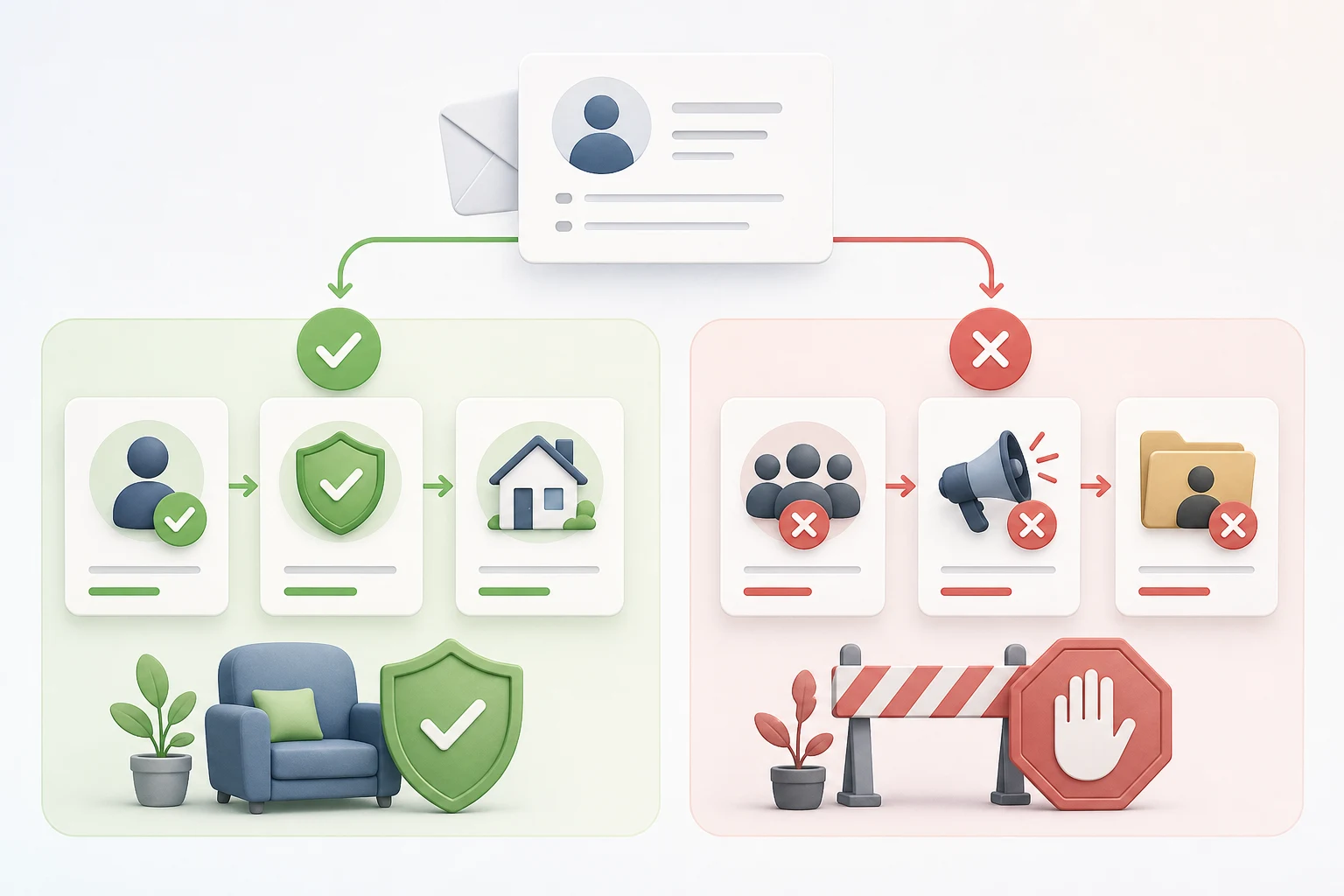
Wrong or banned uses include:
- Stalking, following, or harassing someone.
- Doxxing or sharing private details to shame or threaten others.
- Trying to hack accounts or guess passwords.
- Using information from ReverseThatLookup to decide on jobs, housing, loans, insurance, or similar eligibility.
Those last uses fall under special rules often called FCRA regulations. ReverseThatLookup tools are not made for those decisions and should never be used that way.
When possible, it helps to be open. For example, you might mention to a marketplace buyer or seller that you do basic checks for safety. Always follow each platform’s rules and community guidelines, and respect other people’s privacy and consent.
Your own safety is part of the picture, and knowing whether email lookup sites are safe helps you check an address without quietly putting yourself at risk.
Real-World Scenarios and Quick Answers
Here are a few common situations where email lookups can help without exposing private data. If a “tax refund” email shows up before tax season, a lookup and free search might reveal scam reports for that address, or show that the domain is not tied to your real tax agency. If you are booking a summer vacation rental, you can check if the host’s email lines up with the listing platform and if the name matches across profiles. If someone offers a “limited time investment,” you can look for signs the email is linked to past spam, fake reviews, or no online presence at all. And if you meet a new contact while traveling and plan to meet again, a quick lookup may confirm they use consistent details everywhere, or show enough gaps that you decide to be extra careful.
If the information is thin or mixed, it is okay to slow down. You can choose to stop contact, report the message to the platform, or talk with local authorities or a trusted advisor if you feel threatened or think fraud is involved.
Protect Your Own Email Address
Your email can reveal more than you expect. It may connect to old usernames, public comments, professional pages, breach notifications, or accounts you forgot. Search your own address occasionally so you know what a stranger might find.
If an old address exposes too much, use a separate email for dating apps and avoid including your full name, birth year, workplace, or school in the address. That does not make you anonymous, but it reduces easy cross-platform linking.
Be careful when a match asks you to leave the app immediately for email. Dating apps have reporting and blocking tools. Moving to email early can remove those protections.
Email Lookup FAQ
Can an Email Lookup Show Who Owns an Email?
Sometimes it shows a likely name based on public clues, but it is not a guarantee and could be outdated or incomplete.
Is It Legal to Look Up Someone’s Email Address?
Using lawful tools for personal safety, fraud prevention, and basic identity checks is generally allowed, as long as you follow privacy laws and site rules and avoid banned uses like stalking, harassment, or FCRA-regulated decisions.
Why Did My Search Show Little or Nothing?
Some people keep a low profile or only use that email for private logins, so there may be almost no public trail to connect to that address.
Can Someone Tell If I Searched Their Email?
Legitimate lookup tools do not alert the owner that you ran a search.
How Do I Know If an Email Is Part of a Scam?
Look for pressure to act fast, requests for money or gift cards, spelling mistakes, strange links, and results that do not match what a real company or person would use. Compare suspicious messages with information from official company websites or government agencies.
What If My Email Appears in a Data Breach?
Change your passwords, turn on multi-factor authentication, and be picky about where you post your email. Use different passwords for different accounts and consider monitoring official guidance from reputable cybersecurity organizations.
Can a reverse email search prove someone is real?
No. It can support or weaken a claimed identity, but it does not prove honesty by itself. Compare the email result with photos, profile history, live verification, phone clues, and the person’s behavior before deciding what to trust or share next.
Is no result a bad sign?
Not necessarily. Some people use private addresses, new accounts, or email aliases. No result becomes more concerning when paired with pressure, secrecy, inconsistent names, refusal to verify, requests for money, or a quick push to leave the dating app entirely.
Should I reply to a suspicious dating email?
Do not reply if the message asks for money, codes, private photos, account access, or urgent secrecy. Save the email, search the address and message text, report through the platform if relevant, and block if the pattern looks unsafe or keeps escalating.
Your Safest Next Step Before You Click or Reply
An email address lookup is best seen as a way to gather clues, not to read minds or break into accounts. It helps you spot patterns, confirm details, and decide how much trust to give, but it should never be the only thing you rely on to judge someone’s character.
Before you act on any unexpected email, pause. Run through a few free checks, and when the stakes feel higher, consider a dedicated lookup for more context. When something feels wrong, it is usually safer to block, report, or ask for help than to keep engaging.
At ReverseThatLookup, the priority is giving you clearer information from public and legal sources so you can make safer, more informed choices every time you open your inbox. Always use these tools responsibly, respect privacy and consent, and avoid any use that could harm or unfairly target someone else.
Find Accurate Contact Insights In Seconds
Our email address lookup tool helps you quickly uncover the details you need to verify contacts, reduce bounce rates, and reach the right people with confidence. At ReverseThatLookup, we focus on delivering fast, reliable results so you can keep your workflow moving. If you have questions about specific use cases or need help getting started, just contact us and we will walk you through the process.