


Finding business owner information is straightforward when you know where to look. Public records, state business registration databases, company websites, LinkedIn profiles, and lookup tools can all help you find a business owner’s name, contact details, or registered business address, often for free.
Whether you need to verify a contractor, reach the right decision-maker, or confirm who is responsible for a company before signing a contract, this guide covers the most reliable methods for how to find business owners using publicly available information.
Quick note: Use ownership research responsibly. Public information can help you verify a business, but it should not be used for harassment, doxxing, or assumptions about someone’s private life. When the matter is legal, financial, or high-risk, confirm details through official records or a qualified professional.
Table of Contents
Why Business Ownership Matters
Finding out who owns a business is not only about curiosity. It can help you understand who is responsible for decisions, contracts, customer issues, and public filings.
For consumers, ownership information can help confirm whether a company looks legitimate before sending money or sharing sensitive details. For business professionals, it can help identify the right person to contact about partnerships, sales, hiring, or vendor questions.
It can also matter when there is a dispute. If you need to send a formal notice, review a contract, or understand who is connected to a company, owner and registered agent information may point you in the right direction.
How to Find Business Owners Using Reliable Sources
There is no single source that works every time. The best approach is to start with official information, then compare it with other public clues.
1. Start with the company website
Look for pages labeled About, Team, Leadership, Contact, Press, or Legal. Small businesses often name the founder or owner directly, while larger companies may list executives instead.
2. Search state business records
Most U.S. states have a Secretary of State or business entity search tool. These records may show the legal business name, registered agent, officers, filing status, and formation date.
3. Check business licenses
Local city or county license databases can be useful for contractors, restaurants, salons, repair services, and other regulated businesses. Some license records list an owner or responsible party.
4. Compare directories and reviews
Chamber of Commerce listings, BBB profiles, local directories, trade associations, and review platforms can provide context. Treat these as supporting sources, not final proof.
Find Business Owners on LinkedIn
LinkedIn is one of the most direct ways to find a business owner’s name and professional background. Search the company name, filter by people, and look for titles such as Founder, Owner, CEO, President, or Managing Partner.
If you already found a name in a state filing, search that person on LinkedIn to confirm their current role, company history, and contact options. Treat LinkedIn as a supporting source because profiles can be outdated or incomplete.
How to Find Business Owner Contact Information
Once you identify the likely owner, the next step is finding a responsible contact method. Check the business website, LinkedIn, Google Business Profile, and public records before using paid sources.
If you have the owner’s name and general location, a people search tool may surface publicly associated phone numbers, addresses, and contact records. If you only have a business number, a reverse phone lookup can help connect that number to a business name or location.
Street addresses work the same way, and a reverse address lookup can show property details and resident history that point toward the owner behind a storefront.
Best Places to Find Business Owner Information
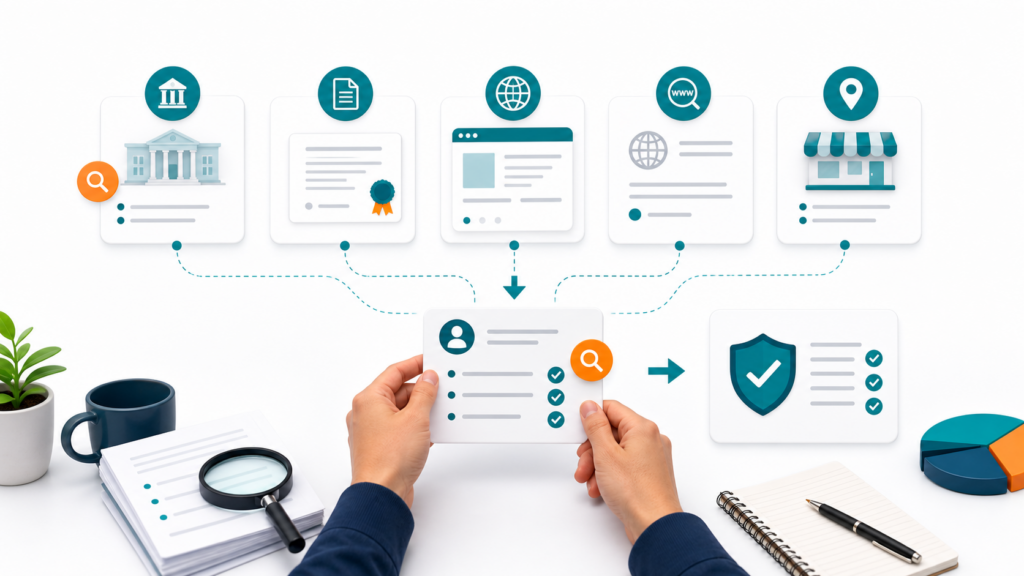
Start with the most authoritative source available, then use secondary sources to fill in gaps. These sources can help with a business owner lookup without relying on a single record.
Secretary of State database: Shows legal names, registered agents, officers, filing status, and formation dates for LLCs and corporations.
Company website: About pages, team pages, founder bios, and contact pages often reveal ownership or leadership details.
LinkedIn: Useful for checking founders, owners, CEOs, presidents, and company history.
WHOIS records: Can show domain registration details, although many websites use privacy protection.
Local licenses and permits: Helpful for contractors, restaurants, salons, and regulated local businesses.
To find business owner information free, start with state business databases, the company website, Google Business Profile, LinkedIn, and ICANN WHOIS lookup. Paid lookup tools can save time when you need to compare several public records at once.
When the only lead is a street address, learning who lives at an address through public records and property databases can connect a location to a person, often for free.
Where to Find New Business Owners
If you are looking for recently formed companies, start with state business registration databases. Many allow you to search by filing date, entity type, or business name. Local business journals, city permit records, chamber announcements, and press releases can also surface newly opened companies.
Specific Sources for Newly Registered Businesses
- Secretary of State filings filtered by date: Search recently formed entities in your state or region.
- Local business journals: Look for new business announcements, license reports, and local startup coverage.
- City permit portals: Commercial permit applications may list an applicant, address, or business name.
- Google Maps: Search by category and look for recently opened locations.
- LinkedIn company pages: Check newly launched businesses by industry, city, or founder activity.
If you have a phone number or address tied to a new business, a reverse phone lookup or reverse address lookup can help connect it to a business name or owner record.
Find Business Owner by Phone Number, Email, or Address
Sometimes you need to find a business owner but only have a contact detail, such as a phone number from an invoice, an email from a message, or a street address from a listing. Lookup tools can help connect these clues to business owner information.
For example, a reverse phone lookup may help identify whether a number is associated with a company, location, or public listing. If your starting point is an email address, an email lookup can sometimes connect it to online profiles or business references. If you are checking a physical location, a reverse address lookup may help you understand what businesses or records are tied to that address.
Keep expectations realistic: Lookup results can vary. Data may be incomplete, outdated, duplicated, or connected to a previous owner, employee, or location. Use lookup results as leads to verify, not as guaranteed answers.
Verifying those leads usually means going to the records themselves, and knowing how public records search engines work helps you find court, county, and agency sources faster.
How to Verify What You Find
Once you have a possible owner name, compare it across multiple sources. A match on one directory is useful, but a match across official state filings, a company website, business licenses, and recent news is stronger.
Pay attention to the difference between an owner, founder, officer, manager, registered agent, franchise operator, and employee. These roles can overlap, but they are not always the same person.
Signs the Information May Be Reliable
- The same name appears in official filings and on the company website.
- The business name, address, and phone number match across sources.
- The record is recent and shows an active status.
- The person is named in credible local news, trade publications, or public documents.
Signs You Should Keep Checking
- The record lists only a registered agent or formation service.
- Different directories show different names or addresses.
- The company recently changed ownership, location, or legal structure.
- The only source is an old cached page, scraped directory, or unverified social profile.

Privacy and Accuracy Considerations
Business records are public for a reason, but people still deserve respectful handling of their information. Avoid publishing personal details unnecessarily, and do not contact someone through private channels if a business contact method is available.
If you are making a legal, hiring, lending, or compliance decision, do not rely only on informal searches. Public lookup tools can help you get oriented, but official records and professional guidance matter when the outcome is important.
Frequently Asked Questions
How can I find out who is the owner of a business?
Start with the business’s official website, then check the Secretary of State business entity database for the state where the company is registered. After that, compare business license records, local directories, BBB profiles, domain records, and news mentions.
Can I find a business owner for free?
Yes. Free sources include Secretary of State business entity searches, the company’s website, Google Business Profile, ICANN WHOIS lookup, and basic LinkedIn search. Paid people search and business lookup tools can help when free sources return limited detail.
How do I find a business owner by address?
Start with a reverse address lookup to check what business names and public records are associated with the address. Then search the address in the relevant state’s business database, Google Maps, and local permit records.
What if the business owner is not listed?
Some businesses use registered agents, management companies, privacy-protected domain records, or corporate structures that make ownership less obvious. In that case, look for officers, managers, founders, license holders, press mentions, or local permit records.
Is a registered agent the same as the owner?
Not always. A registered agent is the person or company authorized to receive official documents for the business. The agent may be the owner, but it may also be a lawyer, filing service, or third-party company.
Can I use social media to identify a business owner?
Yes, but treat it as a supporting clue. LinkedIn, Facebook business pages, and local groups may show founders or managers, but social media profiles can be outdated or incomplete. Confirm with more reliable sources before relying on the information.
What does DBA mean?
DBA means “doing business as.” It is a trade name a business uses instead of, or in addition to, its legal name. Searching both the DBA and the legal entity name can help you connect a public-facing brand to the person or company behind it.
Continue Your Search
Use ReverseThatLookup to review publicly available information connected to the details you already have.